Monday, 30 November 2009

Editing

Final Cut Pro

We used Final cut Pro to edit our video on the apple mac computers provided by the media department. Using Final cut Pro was a lot more efficient when loading the video clips onto the programme than Adobe Preiemere Pro as you could load them directly to imovie and then to the editing programme instead of having to rename all of the files.

When all the files were imported and we started to edit the clips we realised that we had more filming to do, due to shots not being centred and some being shaky. When we had all the shots it was easier to see what went where, as we went along we found it easier and quicker to use short keys, for example 'z' to zoom in and 'b' to cut the clips.

The names of the clips were on the left hand side and you could double click them to make them appear on the screen or drag them onto the editing panel. You also have a second window which you can watch the edited clips on. There is an option to use transitions but due to the fast pace of the music we did not feel it was necessary to use fade in/outs and dissolves.

It was hard to get the actors to sink with the music, taking a lot of time, patience and effort. It also took along time to get the clips in time with the music to make the video come together as an upbeat, fun music video.

This is an example of final cut pro and the layout. You can see where you can drag the clips from the left hand side onto the main panel, using the curser to place the images accuratly.

Wednesday, 25 November 2009

CD covers - draft and finshed versions.

The Front Cover

Here is our first draft of the front cover of the CD. As you can see we have added the background - a photo taken from the hockey pitch of the goal and trees and field in the distance, the main photo of Abi in her first costume - pink top and blue headband. With 3 of the girls in the background with different coloured headbands. We obviously wanted Abi (acting as Kate Miller Heidke) to be the biggest part of the CD and because many of the cd's we looked at had only the artists face on the front cover (Lady Gaga, La Roux) , we decided to use the same idea and aspect. As we were new to the programmes we used, Adobe photoshop and Illustrator we did not know the wide variety of filters we could use on the pictures. Therefore we did not know how to get the effect that we wanted - bright and quirky to match the mood of the song and the artist. So instead we just faded the background and blurred the 3 girls to add the effect that there were on the pitch.
We choose the font as shown earlier in the blog out of a number of choices and decided that it would work best - furthermore we decided the blue for the time being matched the CD cover because it was the same as her head band and stripes.
However once we learnt how to photoshop and learnt all the different tools that could be used - we made BIG changes to the front cover.
Here is our Final Version.


 We began by deciding that the background was not working, and was too dull and did'nt show any real colour. On Adobe Photoshop we filtered the background to get the cartoon effect you can see, we then increased the brightness to it to make sure the colours were much more vivid. Aswell as adding colour to the background we then felt that Abi herself was slightly dull, so we added a line of light from the top left corner diagonally to the bottom right hand corner, this made sure that her hair and face had much more colour to them. Furthermore we made sure that the 3 girls were not as obvious as in the draft and faded and blurred them more into the background. Finally we changed the font hugely adding a drop shadow and completley changing the colour. We felt that the blue was not working and added to the dullness seen in the first draft, therefore we choose a yellowy orange add to the bright effect and match the secondary outfit used by abi seen in the inside cover. We feel that the front cover works very well and creates the themes that we wanted, it is bright and has a sketched style background therefore shows the quirky side of Kate, but the photo of Abi shows the more serious side to other songs on the album.


The Back Cover

 The image you see below is not the very first draft but the second draft. The first draft had no effect on the background and looked much duller. Furthermore the font had no colour to it or shadow to it - looking very plain and normal (not the effect we wanted). Obviously the song list is a vital part of the back cover because it lets the buyer know what they are getting. Therefore the backcover has to look good and display the artists style.  We feel that we did not do this in this draft and so had to re-do it and make some changes - especially to the font. We also needed to add key information and a barcode on at the bottom of the cover,


As you can see the changes we made are not as obvious as the changes on the front cover. However we did make some very important changes that effect the back cover. For example the font has been tweeked - Different shades of oranges are ised and the drop shadpw has been added. We also made the sketchy effect more obvious on the background and added a light from the top right corner - using soft light. We decided to make the back cover overall a bit darker than the front. Furthermore a barcode has been added and on the final version, information will be added about the record label, producers etc.
The Inside Cover


Here is the final version for the inside cover of our digi pack. While researching many digi packs from popular artists we discovered that it was very common and also popular to have the inside cover both panels. So we decided to follow this convention and display many images of Abi in different poses across the hockey pitch where we filmed a large part of our video. We feel that this effect works very well and each image displays the style of our video and also Kate Miller Heidke. To create this effect we used both Adobe Photoshop and Adobe Illustrator. We began the process by taking a picture of the background that we decided to use, the picture we took works very well because it covers a large amount of the hockey pitch, the goal and the autumn trees that is also seen on the front cover. We then kept the camera in the exact same position and took many pictures of Abi around the pitch in different poses, close up and far away from the camera. Once the pictures were taken we uploaded the background on to Photoshop and then cut out and cropped the pictures of Abi and imported them on to the background. Because we had never used photoshop before this took a while to get used to but once we worked out exactly what to do it became second nature, this process also showed us how important the layers were on photoshop. Once all the photo's were on the main background we made sure it actually looked like each figure was on the pitch by smoothing around the edges and adding shadows. Finally we added some lighting to the background and our final image was created.
As a final touch to the inside cover we followed the convention of many digipacks and added extra information about the singer, produces, artwork etc in the bottom right panel. We did contemplate whether to create a booklet but thought it was pointless because no other extra information needed to be added.


Digi pack completley finished - We were very pleased with the final version of the digi pack and feel that it looks like a real album. I believe that the inside cover works very well and the effectts that we found out while using photoshop also work very well on the front and back cover. The final version certainly displays the style we were after and displays the theme that is displayed in the music video and also Kate Miller Heidke's other videos.


Intial Ideas - Advertisement

  • We feel that the picture used on the inside of the CD cover - Abi in different poses around the hockey pitch - is very effective and works well. Therefore we will crop this and use it as the background for the advertisement.
  • We will change the colours of the background - adding more light to the sky, making a lighter blue and also adding a ray of yellow light to act as sunlight. We will also use less of the pictures because we do not want it to be too messy of overcrowded.
  • The font used will be the same as the CD cover for Kate Miller Heidke & Little Eve but will be different when writing other information such as what songs the album will include, when the album is out, the website etc.
  • Other Idea's - Will have a similar setup to the previous idea but a different background will be used - instead will have Abi leaning against the metal fence with the hockey pitch in the background. This image will work well becasue of the fence that will cover the whole poster.
  • The fonts will be the same as the previous idea but because there will be more space, more information will be displayed, e.g reviews and a picture of the CD front cover will be displayed on it.

Tuesday, 24 November 2009

Choices of Font Type

Choosing the right font is essential to our CD cover and how the final image is portrayed. We wanted to find a font which was fun and quirky like Kate's style of music, avoiding common fonts such as Times New Roman, Comic Sans and Arial which would mainly be used for magazine articles, newspapers, books and website pages.
A great site with a wide variety of fonts on is fontspace.com which gave a wide variety of hand written and fun fonts to choose from. A few examples of fonts that we looked at include;


As you can see we have looked at a wide range of fonts from both fontspace and 1001freefonts which give anyone the chance to download thousands of fonts. We decided to look at a variety of fonts from a more stylish but simple look seen in 1. and 3. to more exciting fonts such 4. and 5. which use a curly style and a brush style. However we decided that we wanted something more in the middle that was both stylish and quirky.


We chose 2 different fonts to match the mood of the song and Kate's overall theme. This first one we choose as seen bellow was because it wasn't too feminine and it was slightly different and quirky which is how Kate Miller Heidke sees herself. However this font will not be used on the CD cover and instead will be used to display key information on the advertisement - such as hits the album includes, website information and when it is out.


The second font we choose was from a different website - www.1001fonts.com. This one will be used for the CD cover and will be used for Kate's name and Little Eve (the album title). We will this one is more exciting and quirky that the first and will suit the front cover and background of the album.


Saturday, 14 November 2009

Magazine advertisments


As you can see from the 4 sample magazine advertisments from KERRANG! they all vary from no writing at al which would be more common from a well known artists, such as 'Them Crooked Vultures', to album adverts with lots of writing on them such as 'The Blackout' who have written about their new single, their tour and website page. You  can also see that their background is the same as their album cover with the same font and colour on the advert also. The advert for Flyleaf is inbetween with when it's out and where you can buy it from, showing a clear and simple advert.

Wednesday, 11 November 2009

Looking Back on the First Day of Filming


Camera Equipment – We have had no problems using the SD camera and were able to get some important shots still shots using the tripod. However we hope to use more moving shots with the tracking and dolly. Furthermore we had hoped to be able to use two camera’s at once but unfortunately the other camera’s were in use and therefore we could not do this. This would have been useful to make sure when it came to the editing process we would have a number of different angles and shots to choose from.


Our first day of filming on Sunday went well in terms of planning and practice. We found out exactly what we wanted to do and how we could improve previous shots filmed that day. However we did not get as much filmed as we had hoped to do and only filmed about 25 minutes of footage, this meant that when we came to the editing stage we would struggle to edit the whole video effectively.


We therefore realised that we needed to plan each individual shot before our next filming day to make sure that we were thoroughly organised and would not have to make the filming a time consuming task. Furthermore we need to plan with our actors the exact time and date of when our next film date is so we can make sure that they know when to turn up and what to wear. If we do this then the filming will get done a lot easier without any confusion of timing etc.


Obviously we used the same equipment as last year but we feel we have progressed in our ability to use the equipment since then. Although on our first day of filming we only used the tripod we will hope to use other equipment such as the dolly, tracking and the crane for some important high angles during the chorus.


Monday, 9 November 2009

Filming we want to include

Other key shots which we want to film:

Close up of Abi's face at a high angle whilst singing the first verse.

Close up of Abis foot and her head on her knee - singing into the camera

Close up of "brown eyes" - start with filming the face ad then zoom in on "big brown eyes"

"I've got a feeling that I look absurd" - reflm Abi doing it

Chorus - Have the 4 girls walking in a line in slow motion and film them individually - zooming in and then going back the the full shot.

Chorus 2 - Girls playing hockey and hitting the ball, each girl in the same position hitting the ball with close ups of their faces and the full shot as well.

Further Filming - Lyrics

When we go out dancing on a Friday night
I get this funny feeling something's not quite right
My sense of rhythm is incontrovertibly shite
I can't fake it


Whole verse –

1 Foot up on the bench and head looking into the camera

2 Abi on the floor

3 Putting on her make up

4 Singing into the camera and zoom in

I can see the pity in your big brown eyes
The perpetrator lies between my back and my thighs
It doesn't want to wiggle though I try try try
I can't make it

Whole verse –
1 Abi on the floor
Zoom in

I get the feeling that I look absurd
I get the feeling that I look absurd - and it hurts

Taking off cardigan
Drop hockey stick on the floor
Drop to knees


I just can't shake it
Abi trying to hit the ball but keeps missing, sings into the camera – moving towards it.
Girls are hitting the ball well, sticks go on the floor in sequence and then they swing the stick at same time

Couldn't walk the line inside the country scene
And disco was a flop I'm sure no dancing queen
Couldn't really qualify for breakdancing
I just break it


Close up of feet on bench walking
Fall off the bench – slow motion
Girls doing poses with stick and then Abi falls over/can’t do it

Tried moving my body to the latest hit
Someone called the nurse thought I was having a fit
I execute the moonwalk like I stepped in shit
I can't take it

Give the girls one line each and sing it as they’re moving towards the camera.

I get the feeling that I look absurd
I get the feeling that I look absurd - and it hurts


Sing these lyrics as well

I just can't shake it


Switches between shots of the girls walking with stick over shoulder and Abi missing the ball, and then all of the balls being hit at Abi.

OHH
Switching places on the bench - singing the lyrics


EXTRA
Basic passes with the ball
Dribbling towards the camera


Sunday, 8 November 2009

Magazine advertisment

Components that my advertisment must have our shown on this following example of BWO's advertisment in 'attitude'.


The main focus of the advertisment would be the picture on the front of the cd cover and the two new hit singles. Having the singles written on the advert would make the respective buyers want to get the album and see what new msic they've produced.

I would also include the three past alubms that Kate Miller Heidke has done, with a sticker on the front saying BRAND NEW as she isn't well known in the uk.

Thursday, 5 November 2009

Cd Packaging

How we are going to present our cd cover:

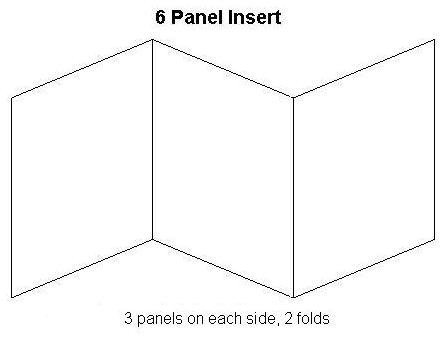
We have are deciding on whether to present our cd in a 6 Panel Insert with the cd in the middle and the two flaps on either side or a normal 4 Panel insert with a wallet on either side to hold the CD and maybe a small booklet of we have time. There are some examples of this below;


We have chosen to have the lyrics of our album on the right hand side of the cd or in a booklet and a picture of Kate Miller Heidke on the left hand side, with a picture on under the plastic case were the Cd goes.
Another idea for the inside of the CD is to have many different pictures of Abi in different poses around the hockey pitch, this will cover the double page of the 4 panel.

The songs in the alubm are as follows:

Partment

Australian Idol

Can't Shake It

Caught In The Crowd

Delay

Don't Let Go

Hello

I Got The Way

Little Adam

Make It Last

Mama

Monster

Out And In

Shoebox

Space They Cannot Touch

The Last Day On Earth

Words

With Can't shake it as the hit single - this will be advertised in the poster

Wednesday, 4 November 2009

Other Artists Typography & Logo


As you can see font choice is crucial when designing a CD cover and advertisement, therefore looking at popular artists logo/font style is an important part of any research task. As you can see above some artists use simple fonts while others uses various fonts with artistic graphics - The Black Eyed Peas & Katy Perry. For our preliminary tasks we have decided to stick to more simple fonts that suit our artist's style. We hope for it to be interesting but not over the top, as the picture will be the main part of the CD cover and poster.

Logo's - A logo is a graphical element (ideogram, symbol, emblem, icon, sign) that, together with its logotype (a uniquely set and arranged typeface) form a trademark or commercial brand. Typically, a logo's design is for immediate recognition. The logo is one aspect of a company's commercial brand, or economic or academic entity, and its shapes, colors, fonts, and images usually are different from others in a similar market. Logos are also used to identify organizations and other non-commercial entities and therefore logo's in the music industry are vital.


Typography in Advertising - Typography has long been a vital part of promotional material and advertising. Designers often use typography to set a theme and mood in an advertisement; for example using bold, large text to convey a particular message to the reader. Type is often used to draw attention to a particular advertisement, combined with efficient use of color, shapes and images. Today, typography in advertising often reflects a company's brand. Fonts used in advertisements convey different messages to the reader, classical fonts are for a strong personality, while more modern fonts are for a cleaner, neutral look. Bold fonts are used for making statements and attracting attention.